Windows 12 Features: Next-Gen AI OS, Design Changes & Requirements
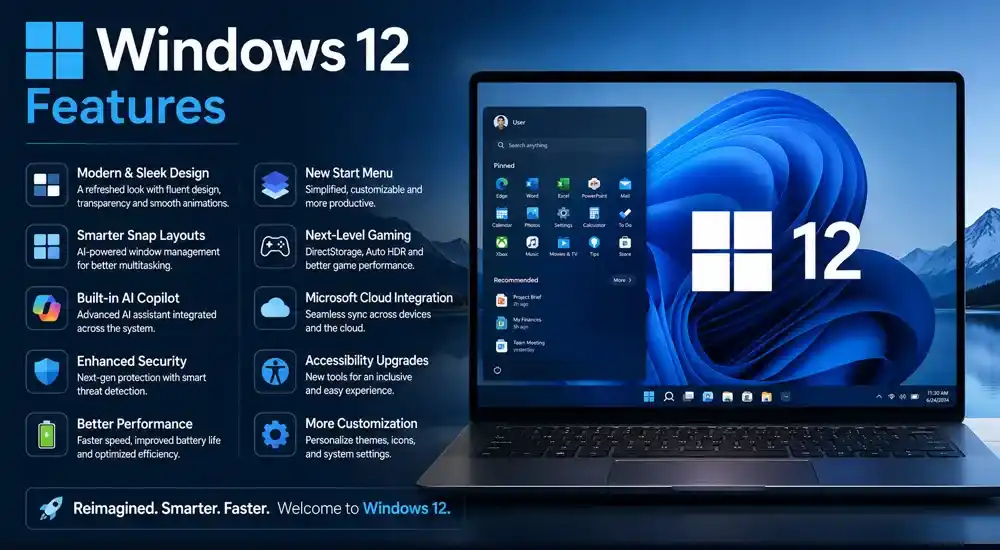
The desktop computing landscape is standing on the precipice of its biggest paradigm shift in decades. While Windows 10 brought stability and Windows 11 delivered a sleek, centralized design overhaul, Microsoft’s next major operating system iteration—widely referred to as Windows 12 (codenamed internally as Hudson Valley)—is built from the ground up around artificial intelligence, modular architecture, and edge computing.
In 2026, personal computers are no longer just passive calculation machines; they are evolving into context-aware digital partners. Driven by neural processing units (NPUs) and deep cloud synchronization, Windows 12 aims to redefine how users interact with files, applications, multi-tasking workspaces, and cybersecurity protocols.
In this exhaustive 2026 technical guide, we cover every aspect of the expected Windows 12 features, user interface leaks, underlying CorePC architecture, hardware prerequisites, gaming enhancements, and how it compares against Windows 11.
1. Windows 12 Release Date & Announcement Timeline
Microsoft has maintained an aggressive engineering schedule focused on rolling out AI capabilities across Windows 11 PC refresh hardware. However, internal preview builds, SDK leaks, and silicon partnership roadmaps indicate that Windows 12 is undergoing heavy testing behind closed doors.
Industry analysts and hardware telemetry suggest the following rollout milestones:
- Developer & Preview Builds: Early Developer Preview rings are anticipated during developer keynotes to give enterprise software engineers time to adapt to new NPU APIs.
- Public Announcement Window: Microsoft is expected to formally unveil the vision for Windows 12 in late 2026 or early 2027.
- General Availability (GA): Commercial OEM rollout on next-generation Copilot+ PCs followed by consumer upgrade waves.
This strategic timing aligns with the widespread availability of consumer processors equipped with specialized high-TOPS NPUs from Intel, AMD, and Qualcomm. This shift matches macro technological changes evaluated across our master analysis on How AI Tools Are Transforming Work, Education, and Daily Life in 2026.
2. Deep AI & On-Device Neural Integration
Unlike previous Windows releases where AI existed as an web-wrapper application (such as early Cortana or basic web Copilot panels), Windows 12 embeds intelligence directly into the kernel, file system, and shell execution layers.
Core AI Capabilities in Windows 12
- System-Wide Smart Recall: An advanced semantic memory system that index activities, open browser tabs, documents, and chat logs, allowing users to search using natural, fuzzy phrasing (e.g., “Find that PDF sales chart I viewed last Tuesday afternoon”).
- On-Device Local NPU Processing: Sub-second responses for voice isolation, video background synthesis, live sub-titling, and document generation without sending personal data to remote servers.
- Context-Aware Automation: Windows 12 proactively prepares your workspace. If you launch a morning meeting, the OS can automatically quiet notifications, pull up relevant meeting agendas, and open corresponding presentation slides.
- AI-Enhanced File Explorer: Smart tag extraction, automatic folder categorization, and instant natural language content summarization inside the native file manager.
These system-level AI workflows complement stand-alone productivity engines evaluated in our guide to the Best AI Productivity Tools in 2026.
3. User Interface (UI) & Redesigned Desktop Shell
Leaked design mockups and internal Microsoft presentation slides hint at a dramatic visual evolution designed to maximize screen real estate and modern touch/tablet interactions.
A. Floating Taskbar Concept
One of the most talked-about visual changes in Windows 12 is the Floating Taskbar. Instead of docking permanently to the bottom screen edge, the taskbar floats slightly above the desktop floor with rounded pill corners, dynamic blur effects, and adaptive sizing that collapses when apps run full-screen.
B. Top System Control Bar
Windows 12 relocates system status indicators—such as Wi-Fi status, battery telemetry, time/date, search status, and quick settings—to a clean, non-intrusive top system bar, similar to mobile and desktop Unix-like operating systems. This separates system management from app switching for cleaner multi-monitor navigation.
C. Dynamic Parallax Wallpapers
Leveraging hardware-accelerated graphics engines, Windows 12 introduces 3D parallax wallpapers that respond to mouse movement, system orientation, and ambient room lighting captured by webcams.
4. CorePC Architecture & State Separation
Under the hood, Windows 12 introduces CorePC—a modernized, modular architectural foundation that splits the operating system into isolated, read-only partitions.
In legacy Windows environments, system files, user drivers, and third-party software write data to shared directories, which can lead to system bloat, registry degradation, and potential malware corruption over time. CorePC fixes this through State Separation:
Advantages of CorePC Architecture
- Ultra-Fast Windows Updates: Updates install in the background on isolated partitions within seconds, eliminating lengthy reboot screens.
- Enhanced System Stability: Critical OS files remain read-only, preventing rogue applications or ransomware from corrupting core boot files.
- Modular Footprint: Microsoft can compile lightweight, stripped-down versions of Windows 12 for budget education devices while deploying full legacy Win32 application support on workstation PCs.
Building these secure, lightweight operating pipelines mirrors structural software optimizations analyzed in our trends index on the Future of AI Tools: Trends and Innovations to Watch in 2026.
5. Performance, Battery Optimization & Cloud Ecosystem
Mobile computing efficiency is a central focus for Windows 12. As ARM-based architectures and hybrid X86/X64 processors dominate ultrabooks, Windows 12 implements intelligent scheduling algorithms:
- AI-Driven Battery Saver: The OS learns user work routines and dynamically caps background CPU/GPU clock cycles for unused apps, yielding up to a 25-30% improvement in active battery endurance.
- Seamless Cloud PC Integration: Windows 12 allows users to instantly shift heavy rendering tasks, code compilation, or complex simulations to cloud-hosted Azure/Windows 365 instances directly from the local taskbar.
- Instant Wake & Memory Compression: Advanced hibernation algorithms ensure near-zero power draw in sleep mode while resuming state instantly upon opening your laptop lid.
6. Next-Gen Gaming & DirectX Innovations
PC gaming continues to be a cornerstone of the Windows platform. Windows 12 introduces deep low-level optimizations specifically for high-frame-rate, low-latency gaming setups:
A. DirectStorage 2.0 & AI Upscaling
DirectStorage 2.0 bypasses the CPU entirely to stream assets straight from high-speed NVMe SSDs into GPU VRAM. Combined with OS-level AI spatial frame interpolation, load screens are virtually eliminated.
B. Auto HDR & Dynamic Refresh Rate Optimization
Windows 12 intelligently analyzes legacy game visuals in real-time, injecting wide-gamut HDR colors and dynamically matching display refresh rates to eliminate micro-stutter without manual driver adjustments.
This level of real-time telemetry processing shares technological innovations with hardware metrics reviewed in How Technology Is Transforming Sports in 2026.
7. Security & Zero-Trust Defense Mechanisms
As cybersecurity threats grow increasingly sophisticated, Windows 12 elevates baseline protection by introducing autonomous threat neutralization:
- AI Threat Detection: Machine learning models continuously scan memory buffers for anomalous behavioral patterns, blocking zero-day exploits before traditional antivirus definition updates are released.
- Passkeys & Passwordless Standards: Windows 12 encourages native Passkey authentication integrated with Windows Hello biometrics, eliminating vulnerable text passwords.
- Hardened Micro-sandboxing: Untrusted web downloads and email attachments execute automatically inside isolated virtual containers to protect host hardware.
8. Expected Windows 12 System Requirements
While Microsoft has not published final hardware specifications, technical parameters leaked from partner OEMs indicate the following baseline requirements for running Windows 12 smoothly:
| Hardware Component | Minimum Requirement | Recommended (For Full AI Features) |
|---|---|---|
| Processor | 64-bit Dual-Core (1.8 GHz+) | Next-Gen Multi-Core Intel Core Ultra / AMD Ryzen AI / Snapdragon X |
| RAM | 8 GB Minimum | 16 GB to 32 GB LPDDR5X |
| Storage | 64 GB High-Speed Storage | 512 GB+ Gen4 NVMe SSD |
| Neural Processing Unit (NPU) | Optional (Basic Cloud AI) | 40+ TOPS NPU (Mandatory for local Copilot+ Recall) |
| Security Module | TPM 2.0 & Secure Boot | TPM 2.0 + Pluton Security Processor |
| Graphics Card | DirectX 12 Compatible GPU | DirectX 12 Ultimate with AI Upscaling Support |
9. Windows 11 vs. Windows 12 Comparison
Understanding how Windows 12 advances beyond Windows 11 helps users evaluate their upcoming hardware upgrade lifecycles:
| Feature Metric | Windows 11 | Windows 12 (Expected) |
|---|---|---|
| Primary Architectural Focus | Visual Redesign & Centered UI | Native AI Integration & Modular CorePC |
| Taskbar Structure | Centered Docked Bar | Dynamic Floating Taskbar + Top Bar |
| Artificial Intelligence | Web Copilot App Overlays | Deep NPU Kernel Integration & Local Recall |
| OS State Isolation | Traditional Monolithic Registry | CorePC State Separation & Read-Only Partitions |
| Update Speed | Standard Background Installation | Seamless Instant Updates (Near Zero Downtime) |
| Hardware Dependency | TPM 2.0 & Supported CPUs | High-TOPS NPU Recommended for On-Device Features |
10. Pros and Cons of Upgrading to Windows 12
Pros
- Unmatched productivity via context-aware on-device AI.
- Faster, safer updates with CorePC state separation.
- Modernized, customizable floating taskbar desktop UI.
- Drastic battery life improvements on portable laptops.
- Top-tier gaming throughput with DirectStorage 2.0.
Cons
- Stricter hardware prerequisites (NPU & RAM requirements).
- Potential compatibility friction with ancient legacy drivers.
- Learning curve for users adapting to the split top bar UI.
11. Final Verdict: Should You Plan to Upgrade?
Windows 12 represents far more than a simple skin change or routine update package. It marks Microsoft’s transition into the era of intelligent, adaptive computing. By shifting core operating systems toward state-separated modular structures and deep local neural execution, Windows 12 sets the technical foundation for the next decade of personal computing.
If you are planning to purchase a new PC in 2026 or beyond, investing in a system with an NPU delivering 40+ TOPS and at least 16GB of RAM ensures your hardware is fully future-proofed for the official arrival of Windows 12. Developing digital skills to navigate these next-generation AI environments remains a vital prerequisite to master the Top Skills Students Should Learn for Future Careers in 2026.
Frequently Asked Questions (FAQs)
What are the main Windows 12 features?
Windows 12 features deep on-device AI integration via NPUs, a floating taskbar, dynamic top system bar, modular CorePC state separation architecture, AI-powered smart search, live translation, and advanced energy optimization.
When will Windows 12 be released officially?
While Microsoft has not announced an official date, industry leaks and Insider telemetry point toward a late 2026 or early 2027 rollout following major Windows 11 updates.
What are the expected hardware requirements for Windows 12?
Expected specs include a 64-bit multi-core processor, 8GB to 16GB RAM, 64GB storage, TPM 2.0, Secure Boot, and an NPU (Neural Processing Unit) capable of 40+ TOPS for full local AI capability.
Will Windows 12 be a free upgrade for Windows 11 users?
Microsoft historically provides free upgrade paths for qualifying devices running recent Windows versions, provided your hardware meets the mandatory security and NPU requirement thresholds.


Comments (0)